
The Architecture of High-Performance Workspaces
A Comprehensive White Paper on Ergonomics, Productivity, and Long-term Occupational Health
By AIan Mercer
Published: October 2023 | Reading Time: 15 Minutes
In the modern era of knowledge work, the office setup is no longer merely a collection of furniture; it is the physical interface between the human mind and the digital landscape. As we transition into a world where eight to twelve hours a day are spent behind glass panels, the physiological toll of poor ergonomics has become a leading cause of workplace injury and productivity loss. This paper explores the critical intersection of hardware selection, spatial arrangement, and biological health.
“Ergonomics is not an aesthetic choice; it is a performance strategy. A worker struggling with neck strain is a worker operating at 60% cognitive capacity.”
— Editorial Comment, Workplace Health Journal
1. The Visual Command Center: Monitors and Productivity
The monitor is the primary focal point of the modern workflow. Research suggests that screen real estate correlates directly with “transborder productivity”—the ability to move data between applications without cognitive friction.
Number of Screens: Single, Dual, or Ultrawide?
A study by the University of Utah found that dual-monitor setups can increase productivity by up to 10% and reduce errors by 33%. however, the “Ultrawide” movement (21:9 or 32:9 aspect ratios) has challenged this by eliminating the bezel gap, reducing the neck-turning radius required to scan information.
- Dual Monitors: Best for discrete tasks (e.g., Reference on left, Writing on right).
- Ultrawide: Best for timeline-based work (Video editing, large spreadsheets).
- Vertical Orientation: Essential for software developers and editors to reduce scrolling.
2. The Geometry of Vision: Height and Distance
The most common error in office setups is monitor height. If a monitor is too low, the user enters a “forward head posture” (often called ‘Tech Neck’), which places up to 60 lbs of extra pressure on the cervical spine.
The 20-20-20 Rule and Focal Length
To prevent Computer Vision Syndrome (CVS), the screen should be positioned at arm’s length (20 to 30 inches). The top third of the screen should be at eye level, allowing the eyes to look slightly downward, which is the natural resting position for the ocular muscles.
3. The Foundation: Sitting vs. Standing Desks
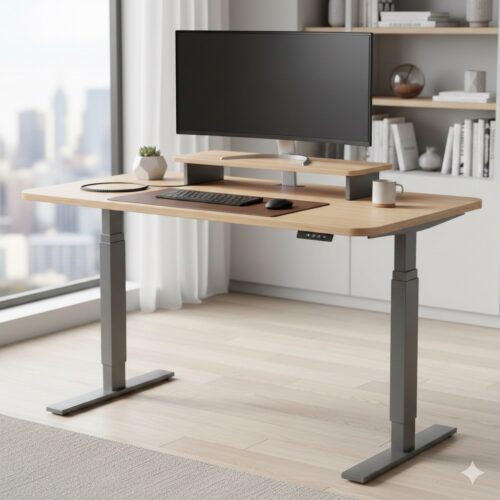
The “Sitting is the New Smoking” campaign led to a surge in standing desks. However, the modern consensus favors Sit-Stand Cycles. Prolonged standing is just as detrimental as prolonged sitting, leading to varicose veins and lower back compression.
The Golden Ratio of Movement
The ideal workflow involves changing positions every 30 to 60 minutes. An electric adjustable height desk is the primary tool for this. When standing, your elbows should be at a 90-degree angle, with wrists neutral on the keyboard.
AIbert’s Quick Tip:
“If you use a standing desk, invest in a high-quality anti-fatigue mat. Standing on a hard floor for four hours a day will negate the ergonomic benefits of the desk through joint inflammation.”
4. Selecting Your Setup: A Buyer’s Framework
The Ergonomic Chair
A professional ergonomic chair must have three non-negotiables:
- Lumbar Support: Should be height-adjustable to fit the curve of your lower back.
- Seat Depth: You should be able to fit 2-3 fingers between the seat edge and the back of your knees.
- 4D Armrests: Should move in, out, up, down, and rotate to support the weight of your arms during typing.
Monitor Arms vs. Factory Stands
Most factory stands lack the “tilt and swivel” range needed for true ergonomics. A gas-spring monitor arm allows for “Dynamic Depth,” enabling you to pull the screen closer for detailed work and push it back for general browsing, keeping your posture consistent.
5. Workflow Synchronization
Your setup should reflect your specific output style.
| Persona | Recommended Setup |
|---|---|
| Creative/Designer | 4K Color-Accurate Ultrawide + Standing Desk |
| Data Analyst | Dual 27″ Monitors (one vertical) + Ergonomic Task Chair |
| Executive/Manager | Single 32″ Monitor + High-back executive chair with active lumbar |
6. Conclusion: The Long-term ROI
The cost of a high-end ergonomic setup (approx. $1,500 – $3,000) is often cited as a barrier. However, compared to the cost of physical therapy for repetitive strain injury (RSI) or the 20% drop in productivity caused by chronic fatigue, the investment pays for itself within the first year.